
AI hug generator · two photos
AI Hug Video from Two Photos
An AI hug video is a short clip in which two people from separate photos turn to each other, hug and look toward the camera. Upload one photo of each person and this generator makes that 5 or 10-second clip, even when one picture is a close-up selfie and the other a full-length shot.
Supports two separate photos, one person in each. Generates a real hugging motion, not a slideshow or a photo transition. 9:16 or 16:9, optional ambient sound, MP4 download with no watermark.
From 9 credits ($0.25) per clip; the default, Seedance 2.0 Mini 5 s 720p, is 18 credits ($0.50). No subscription; failed clips are refunded.
Make your hug video
Gentle hug · 5 s · 720p · 9:16
Credits are taken when the clip starts and returned automatically if it fails.
Photos are used only to make your video and are never shown publicly.
Two photos in, one hug out
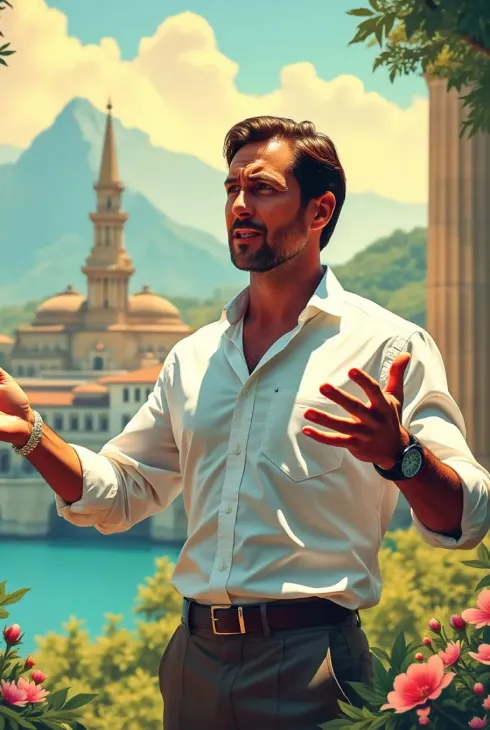
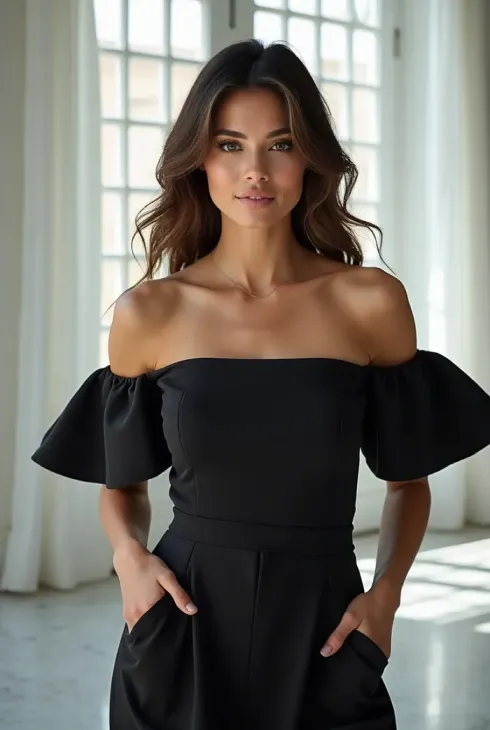
Two photos in, one AI hug video out
Five finished hug clips. The first started from two separate photos with different backgrounds, shown beside it: the hug takes place in photo 1's setting. The last three started from one picture of the two people already together.
Window hug from two different photos
From two separate photos · 5 s · no sound
A painted-terrace portrait and a window portrait become one bright room; both faces stay readable in the hug.
Older man and young woman meet in a park
4 s · no sound
16:9. They meet from each side under the trees and hold the hug.
Couple under blossom trees
From one photo of both · 5 s · no sound
Walking side by side, then they stop, turn and hug.
Couple in a gallery
From one photo of both · 5 s · no sound
A side-on hug between sculptures; the room stays still.
Couple at a street market
From one photo of both · 5 s · no sound
Holding hands, then a close hug; the busy stalls stay in place.
Which two photos work: the photo-pair check
Make two people hug with AI and the model reads each photo as an identity reference: face, hair, age, build and clothes. It does not cut people out and paste them side by side. It draws both again in one new shot, starting from photo 1's setting. That is why some mismatched pairs work as they are and others need a quick fix before uploading.
| Your two photos | What the model does | Fix before uploading |
|---|---|---|
| A close-up selfie and a full-length shot | It has to invent the selfie person's body and clothes below the shoulders, so outfits can drift and heights can look off. | Use a waist-up photo of both if you have one. If not, make the full-length photo photo 1: its framing sets the shot. |
| Photos taken in different countries or rooms | Only one place survives. Photo 1's background and light become the scene; photo 2's background is dropped. | Put the photo whose place you want first. Pick two pictures with similar light: both daylight or both indoors. |
| An old print or black-and-white photo next to a new selfie | Grain, scratches and faded colour are read as part of the face, so the person can come out blurred, oddly coloured or looking like someone else. | Scan the print, or photograph it flat in daylight, crop to head and shoulders and remove dust and scratches. |
| A group photo | With several faces in one reference, the model can pick the wrong person or blend two of them. | Crop each person into their own photo with no other face in frame. |
| One photo with both people already together | Uploading the same picture twice hands the model the same pair twice, so people can be duplicated. | Crop it into two photos, one person each. The one-photo examples above show what such a pair can become. |
| Sunglasses, a hat brim, a mask or a hand over the face | Hidden eyes and hairlines are guessed, and the guess changes once heads turn during the hug. | Choose a photo with the face uncovered and both eyes visible. |
| A small chat photo or screenshot | Too little detail to hold a face. Photos under 300 px on the short side are refused before any credits are used. | Ask for the original file or export the photo again at full size. |
| A person and a dog or cat | The motion is written for two people (arms around shoulders and backs), so a pet gets a human pose or turns into another animal. | Not supported here. Use two photos of adults. |
Why an AI hug video looks weird: blended faces and the photo choices that prevent them
When two heads come together, the model has to keep two identities apart in a small patch of the frame. If the photos are alike (same angle, same light, similar hair) or one face is small and soft, it averages them: features swap, or one face takes on the other's look.
The prompt this generator sends already asks for faces slightly offset at three-quarter angles and for hands on shoulders and backs. The photos do the rest: a clear face of a decent size in each, clothes that differ, and no third face anywhere in frame. Seedance 2.0 Pro holds faces better than Mini in a close hug, and 720p or 1080p gives each face more pixels than 480p.
Check the finished clip at the moment the hug is tightest. If a face has changed, try again with sharper photos rather than the same pair; a new run costs credits again.
Old, scanned and black-and-white photos
An old print of a parent or grandparent is the most common reason a hug clip looks wrong. Scan it, or photograph it flat in daylight without glare, crop to head and shoulders, and clean up tears and dust in any photo editor.
Colourising is a choice, not a requirement. A black-and-white face next to a colour selfie usually comes out in colour anyway, with the model guessing skin and hair tones. If you know the real colours, colourise first and compare the result with what you remember; if not, leave it. Skip AI enhancers that sharpen a face until it no longer looks like the person.
Use only photos you have the right to use. For a relative who has died, talk to the rest of the family before sharing the clip, and label it as AI-generated when you post it.
Real hug motion vs a photo slideshow template
Many AI hug video app templates in phone editors only move between your two photos with a zoom or a fade; nobody actually moves. This generator turns the photos into video: the two people turn, raise their arms and hug in one continuous shot, which is what an AI hug photo to video tool should do. Before paying for any hug app, look at a sample: if arms wrap around a back, it is generated motion; if the photos slide or crossfade, it is a slideshow.
What it does not do: kisses, dancing, group hugs of three or more, or angel and heaven effects. Searches such as AI hug & kiss video or hug in heaven lead to different templates.
How to make an AI hug video from photos
Works in a phone or desktop browser; nothing to install.
- 01
Pick and crop two photos
One adult per photo, face clear, waist up if you can. Crop group photos down to one person.
- 02
Set the order and the hug
Photo 1's background becomes the scene. Gentle: already close, a calm hug. Reunion: they step in and embrace.
- 03
Choose model, length and frame
Seedance 2.0 Mini, 5 s, 720p is 18 credits; Pro and 10 s cost more. 9:16 or 16:9 at the same price.
- 04
Make it, check it, download
About 1–5 minutes. Check both faces at the tightest point of the hug, then download the MP4. No watermark.
AI hug video price, free credits and watermark
Every option this AI hug video generator offers, in credits and in what those credits cost at the Creator Pack rate (the cheapest per credit).
| Model | Length | Resolution | Credits | Creator Pack value |
|---|---|---|---|---|
| Seedance 2.0 Mini | 5 s | 480p | 9 | $0.25 |
| Seedance 2.0 Mini | 5 s | 720p | 18 | $0.50 |
| Seedance 2.0 Mini | 10 s | 480p | 17 | $0.47 |
| Seedance 2.0 Mini | 10 s | 720p | 36 | $1.00 |
| Seedance 2.0 Pro | 5 s | 480p | 30 | $0.83 |
| Seedance 2.0 Pro | 5 s | 720p | 65 | $1.80 |
| Seedance 2.0 Pro | 5 s | 1080p | 160 | $4.44 |
| Seedance 2.0 Pro | 10 s | 480p | 60 | $1.66 |
| Seedance 2.0 Pro | 10 s | 720p | 129 | $3.58 |
| Seedance 2.0 Pro | 10 s | 1080p | 320 | $8.87 |
Sound and frame do not change the price. Credits come in one-time packs; the first purchase is $9.90 for 170 credits, enough for 9 default clips or 18 at Mini 480p 5 s.
| Question | Answer |
|---|---|
| Free clip | None. Eligible new accounts get 3 sign-up credits, fewer than the cheapest clip (9 credits). |
| Sign-in | Needed to make and download a clip. The page, examples and prices are open to everyone. |
| Watermark | None. The MP4 downloads as made. |
| Subscription | None. One-time credit packs, valid for 365 days. |
| Failed or declined clip | Credits come back automatically. A finished clip you want to redo costs credits again. |
Copyable AI hug video prompt
This is the exact prompt the generator sends with your two photos. Paste it into another image-to-video tool that accepts two reference images; switch the style and length to see each version.
Create a 5-second natural, affectionate hug video using exactly two uploaded identity-reference images. Image 1 defines person A; image 2 defines person B. Keep each person's own facial features, age, skin tone, hair, body proportions and clothing distinct throughout. Do not merge faces, swap identities or invent a third person. Place both people together in a simple, softly lit setting inspired by image 1. Match the lighting without changing either identity. Show both from at least the waist up with their arms visible. Use one steady eye-level medium shot, no cuts, zooms or photo transitions. Seconds 0–1.5: already standing close, they turn gently toward each other. Seconds 1.5–4: both slowly raise their arms and settle into a calm, comforting hug. Seconds 4–5: hold the hug with quiet breathing and a small smile; no dramatic gestures. Keep faces slightly offset at three-quarter angles so neither face passes through the other. Hands rest naturally on the shoulders or upper back, with no extra fingers, limbs or intersecting arms. No kissing, talking, fantasy transformations, angel wings, captions, logos or watermarks. Silent video, no music and no speech.
What the AI hug trend is
AI hug videos spread on TikTok in autumn 2024, when people used Luma AI's Dream Machine to turn two photos into a clip of the pair hugging, often a relative who had died or someone living far away. The format stayed: today an AI hug usually means any two person hug AI clip made from two photos, and many people send one instead of a virtual hug GIF.
AI hug video FAQ
Can I use one photo where both people already stand together?
Crop it into two photos, one person each, and upload both. The same picture uploaded twice gives the model the same pair twice, which can duplicate people. The one-photo examples on this page show the kind of hug such a pair turns into.
One photo is a close-up selfie and the other a full-length shot. Will the hug look right?
Usually, but the selfie person's body and clothes below the shoulders are invented. Make the full-length photo photo 1 so its framing sets the shot, choose 10 s for a slower approach, and check that the heights look believable.
How do I pick the right two people out of a group photo?
Crop each person into their own image so no other face is in frame, and keep at least 300 px on the short side after cropping. If the crop gets too small, use another photo of that person.
Should I restore or colourise an old photo first?
Restore, yes: remove scratches and dust and crop to head and shoulders. Colourise only if you know the real colours; otherwise the model guesses them anyway. Avoid face enhancers that change the person's features.
Can I make an AI hug video with my dog or cat?
Not with this generator. Its motion is written for two people, so pets come out in human poses or change shape mid-hug. Use it for two adults.
Can I hug my younger self from a childhood photo?
No. This site does not accept photos of anyone under 18, including your own childhood photos, so hug-your-younger-self clips cannot be made here.
If the faces come out wrong, do I pay again?
A failed or declined clip returns its credits automatically. A finished clip in which a face changed counts as a result, so another try costs credits again. Sharper, front-facing photos and Seedance 2.0 Pro at 720p fix most face drift.
Is the AI hug video free, and is there a watermark?
There is no free clip: the 3 sign-up credits eligible new accounts get are below the 9-credit minimum. Clips have no watermark and download as MP4; the first pack is $9.90 for 170 credits.